Showing posts sorted by relevance for query sim-swap. Sort by date Show all posts

Friday, 26 April 2024

Hackers Can Steal Your Number: Here's How to Fight Back (SIM Swap Scam)

Sim swapping, also known as SIM hijacking or SIM splitting, is a sneaky way hackers can steal your money and personal information. Here's how it works:

The Scam:

  1. Intel Gathering: Sim swappers first collect your personal details like address, birthdate, and possibly even info about your phone plan. They might use phishing emails, buy information on the dark web, or even trick you into revealing it unwittingly.
  2. Impersonating You: With your personal details, the hacker calls your mobile carrier pretending to be you. They claim to have lost their phone (which is actually your phone number) and request a SIM swap to a new SIM card (which they control).
  3. Taking Over Your Number: If the social engineering is successful, the carrier unwittingly transfers your number to the hacker's SIM card. Now all calls, texts, and even two-factor authentication codes sent to your number will go to the hacker's device.
  4. Draining Accounts: With control over your phone number, hackers can bypass two-factor authentication and access your bank accounts, email, and other online accounts. They can then drain your funds, make unauthorised purchases, or even impersonate you to scam others.

Protecting Yourself:

  • Be Wary of Unsolicited Calls & Emails: Don't reveal personal details over calls or emails from unknown sources. Contact your mobile carrier directly if you receive suspicious requests about your account.
  • Enable PIN/Password on SIM: Many carriers allow adding a PIN or password to your SIM card. This extra layer of security makes it harder for someone to impersonate you and get a SIM swap.
  • Use Security Apps: Consider using security apps that offer two-factor authentication beyond SMS verification. Options like authenticator apps on your phone or hardware security keys can provide stronger protection.
  • Be Mindful of Social Media: Avoid sharing excessive personal details on social media, as this can be a goldmine for information for hackers.

By following these steps, you can make it much harder for SIM swappers to steal your identity and your money. If you suspect you've been a victim of a SIM swap, contact your mobile carrier immediately and report the incident.


How To Enable SIM PIN Lock On iPhone 15 & iPhone 15 Pro


Use Authenticator Apps or Password Managers with TOTP

Sunday, 3 December 2023

What is SIM SWAP FRAUD?

Here's a summary of the scam and how to protect yourself:

What is SIM SWAP FRAUD?

SIM SWAP FRAUD is a type of scam where criminals trick your mobile phone provider into transferring your phone number to a SIM card under their control. This allows them to intercept your text messages, including those used for two-factor authentication (2FA), and access your online accounts, including your bank account.

How does it work?

The criminals will call you and pretend to be from your mobile phone company.

They will tell you that there is a problem with your network and that you need to press 1 to fix it.

If you press 1, the criminals will be able to take control of your SIM card.

Once they have control of your SIM card, they will be able to intercept your text messages and access your online accounts.

How to protect yourself:

  • Be cautious about sharing personal information. Don't share your phone number, Social Security number, or other personal information with people you don't know and trust.
  • Set up strong passwords for your online accounts. Use a different password for each account, and make sure your passwords are strong and complex.
  • Enable two-factor authentication (2FA) for your online accounts. 2FA adds an extra layer of security to your accounts by requiring you to enter a code from your phone, in addition to your password, when you log in.
  • Be careful about clicking on links or opening attachments in emails or text messages. These could be phishing attempts that are designed to trick you into revealing your personal information or clicking on a malicious link.
  • Be aware of the warning signs of SIM SWAP FRAUD. If you suddenly lose service on your phone, or if you receive a text message that says your SIM card has been changed, contact your mobile phone provider immediately.
For more information, visit Sim-swap fraud by Which?


Also at https://www.instagram.com/reel/C0kIQ5FIdrB/?igshid=MTc4MmM1YmI2Ng==

Thursday, 22 May 2025

Sim-swap scammers exploit weak email security

Sim-swap fraud is when a scammer steals your phone number by tricking your mobile network provider into transferring the number to a Sim card that they own. The scammers then attempt to hack into your accounts using one-time passwords sent by text.

Recent cases point to weak email security opening the door to fraudsters, but are mobile networks doing enough to protect customers? Find out what's really happening and what you can do to protect yourself against this nasty scam.

Five steps to prevent Sim-swap fraud

Source: Which? (21 May 2025)

Wednesday, 15 July 2026

Outlawing the Outlaws: How the UK’s SIM Farm Ban is Shutting Down Bulk Fraud

The UK is set to become the first country in Europe to officially ban the possession and supply of "SIM farms".Passed under the landmark Crime and Policing Act 2026, this legislation directly outlaws the physical tools criminals use to orchestrate bulk text message scams, marking a major leap forward in the fight against cyber-enabled fraud.

With fraud accounting for more than 40% of all reported crime in England and Wales, the ban provides law enforcement with a crucial weapon to disrupt scammers at their source.

What is a SIM Farm?

Also known as a SIM box, a SIM farm is a physical electronic device capable of holding five or more SIM cards simultaneously or interchangeably.

By connecting these boxes to a computer, fraudsters can send thousands of text messages or place automated phone calls at the touch of a button. Previously, these low-cost devices were easily purchasable online with zero identity verification, making them highly accessible to criminal gangs.

How Criminals Exploit Them

Before this legislation, SIM farms served as the engines behind some of the UK’s most persistent scam campaigns:

  • Industrial-Scale Smishing: Criminals use them to blast out hundreds of thousands of fake parcel-delivery notifications, tax rebate warnings, or bank alerts in minutes.

  • Creating Fake Accounts: Scammers use SIM farms to rapidly receive SMS verification codes, allowing them to mass-generate "verified" fake profiles on social media and messaging apps.

  • Evading Detection: By routing messages across many different PAYG (pay-as-you-go) SIM cards, criminals could easily bypass standard telecom security filters.

How the Ban Helps Protect the Public

The new law introduces a powerful shift in how the police can prosecute fraudsters.

Old SystemUnder the Crime and Policing Act
Proof of Intent Required: Police had to catch fraudsters actively using the devices to commit a scam to secure a prosecution.Illegal to Possess: Simply possessing, importing, or supplying a SIM farm without a legally proven, legitimate reason is now a criminal offence in its own right.
No Barriers to Entry: Devices were cheap, unregulated, and widely available to purchase online without ID checks.Heavy Penalties: Offenders face unlimited fines in England and Wales, and a £5,000 fine in Scotland and Northern Ireland.
Voluntary Industry Blocklists: Networks tried to block numbers, but criminals could quickly swap SIM cards.Stops the Supply: Shuts down the local distribution of the hardware itself, forcing criminals to use more expensive, easily tracked web alternatives.

Legitimate Exceptions: The law does include protections for legitimate industries that use SIM multiplexers—such as public transport Wi-Fi routing, emergency broadcasting services, and telecom network testing.

By combining this ban with Ofcom's new rules restricting text volumes on PAYG cards, the UK is successfully dismantling the cheap, high-volume infrastructure that has plagued mobile users for years.

Ofcom’s rules target a major loophole used by international scammers. Scammers abroad know we are far more likely to answer a call displaying a familiar UK mobile number (+447) than an unknown international country code.

Stopping this trick—known as Caller ID spoofing—is technically much harder for mobile numbers than it is for landlines. This is because roaming is a legitimate feature; a real UK mobile user needs to be able to make calls from Spain or the US and still display their genuine +447 number to friends back home. (Ofcom)

To solve this, Ofcom has introduced a clever two-pronged strategy targeting both network-level blocking and a new "withhold and verify" protocol.

1. Stopping Landline Spoofing (The Foundation)

To understand how Ofcom is tackling mobile numbers, it helps to look at what they have already successfully rolled out for landlines.

  • Blocking Network Numbers: Telecoms providers must block international calls where the Network Number (the hidden background data showing where a call is physically routed from) is disguised as a UK landline.

  • Blocking Presentation Numbers: Providers must block calls from abroad that try to display a UK landline as a Presentation Number (the caller ID number you actually see on your screen).

  • The Result: When BT voluntarily piloted this rule, they successfully blocked up to 1 million scam calls a day from entering their network.

2. The New Mobile Spoofing Rules: "Withhold and Verify"

Because direct blocking would accidentally cut off legitimate UK tourists calling home from abroad, Ofcom’s latest guidance introduces a dynamic verification model:

      Incoming International Call (carrying a UK +447 number)
                                │
                                ▼
         Can the UK home network verify the SIM is roaming?
                     /                      \
                   YES                       NO
                   /                          \
                  ▼                            ▼
        [ Allow Caller ID ]           [ Withhold Caller ID ]
     Displays "+447..." to user      Displays "Number Withheld"
  • Automatic ID Withholding: If an incoming call originates from an international network but presents a UK mobile (+447) number, the UK gateway provider must automatically strip away the caller ID and display the call as "Number Withheld" or "Unknown".

  • The Roaming Verification Bypass: The original, genuine UK caller ID will only be restored if the recipient's home network can securely verify that the customer's actual SIM card is genuinely roaming on an overseas partner network.

  • Protecting Legitimate Businesses: If a legitimate UK business operates an offshore call centre, they can only present their UK business number if they route their calls through verified, authenticated VoIP or cloud-PBX systems that prove their legal connection to a UK network.

Why This is Highly Effective

While scammers can still physically place the call, they can no longer trick you by displaying a fake, trusted UK mobile number.

Instead, their call will show up on your screen as "Withheld" or "Unknown." Because only 9% of UK consumers say they are likely to answer an unknown or withheld international call, the financial incentive for overseas criminal networks to target the UK is heavily disrupted.

Important: While these measures block a massive portion of automated spam, keep exercising caution with unexpected calls from withheld numbers, and never share security codes or transfer money over the phone.


Thursday, 9 January 2025

5 steps to prevent Sim-swap fraud

Sim-swap fraud is when a scammer steals your phone number by tricking your mobile network provider into transfering it to a Sim card that they own. They then attempt to hack into your accounts using one-time passwords sent by text.

It can be staggeringly easy for a scammer to steal your phone number and reports of this type of fraud have doubled year-on-year. Read our five steps you can take to protect yourself.

Protect your phone number

Source: Which? (09 Jan 2025)

Thursday, 30 April 2026

Sim-swap fraud warning

Sim-swap fraud is when a scammer steals your phone number by tricking your network provider into transferring it to a Sim card they own. The scammer then attempts to hack into your accounts using one-time passwords sent via text.

Recent cases point to weak email security opening the door to fraudsters, but are mobile networks doing enough to protect customers? Find out what's really happening and what you can do to protect yourself against this nasty scam. 

Source: Which? (30 Apr 2026) 

Thursday, 20 March 2025

How to set up authentication code in Bitwarden


If you have a free bitwarden account (a cross-platform password manager), and not a premium personal account, you could use the aegis app as shown at https://bexleywatch.blogspot.com/search?q=aegis to setup 2-step codes. This is better than using a mobile device to avoid sim-swap issues as shown at https://bexleywatch.blogspot.com/search?q=sim-swap

https://bexleywatch.blogspot.com/2026/03/working-together-for-safer-bexley.html

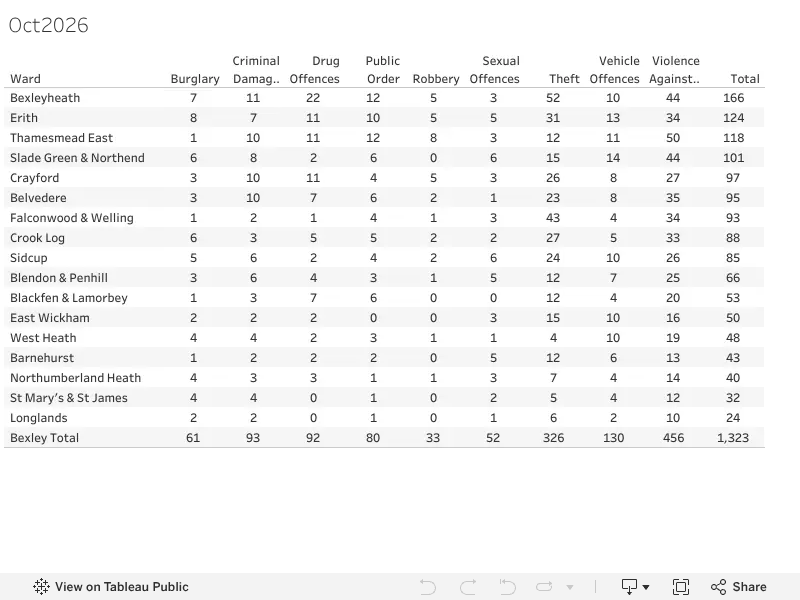
Bexley Crime stats ward summary Oct 2026

Source: Bexley Watch Viz