Showing posts sorted by relevance for query aegis. Sort by date Show all posts

Saturday, 20 July 2024

Lock Down Your Digital Life: Free Forever Password Management with Bitwarden and Aegis

Are you tired of juggling countless passwords and worrying about cyber threats? It's time to take control of your online security without breaking the bank. This guide will show you how to create an impenetrable digital fortress using two free, powerful tools: Bitwarden and Aegis OTP.

Why Bitwarden and Aegis?

  • Bitwarden: This open-source password manager offers unlimited password storage, secure sharing, and cross-platform compatibility. Best of all, it's completely free!
  • Aegis OTP: A simple, effective app that generates six-digit one-time passcodes (OTP) for added security. Also free.

Together, they form a formidable duo that can protect your sensitive information from prying eyes.

How it Works:

  1. Create a Strong Bitwarden Master Password: This is the key to your digital kingdom. Make it long, complex, and unique.
  2. Store All Your Passwords in Bitwarden: From email to banking, every account deserves a strong, unique password. Let Bitwarden generate and store them securely.
  3. Enable Two-Factor Authentication (2FA): For an extra layer of protection, use Aegis to generate OTPs for your accounts that support 2FA.
  4. Sync Bitwarden Across Devices: Access your passwords effortlessly on your computer, smartphone, and tablet.

Going Premium: When to Consider Paying

While the free versions of Bitwarden and Aegis are excellent, you might consider upgrading to Bitwarden Premium for these additional benefits:

  • Advanced Security Features: Password health reports, breach monitoring, and emergency access.
  • Enhanced Convenience: Biometric authentication, one-click password filling, and family sharing.

If you decide to pay for Bitwarden Premium, you no longer need Aegis, as Bitwarden's built-in authenticator provides similar functionality.

Tips for Maximum Security:

  • Regular Password Audits: Use Bitwarden's features to identify weak or reused passwords.
  • Enable Dark Web Monitoring: Stay informed about potential data breaches.
  • Keep Your Software Updated: Ensure both Bitwarden and Aegis have the latest security patches.
  • Beware of Phishing Attacks: Be cautious of suspicious emails and links.

By combining the power of Bitwarden and Aegis, you can significantly enhance your online security without spending a dime. Take control of your digital life today and enjoy peace of mind knowing your valuable information is protected.

Keywords: Bitwarden, Aegis OTP, password manager, two-factor authentication, online security, data protection, free tools, cyber security.


(GDPR) Visit https://bitwarden.com/pricing/, https://getaegis.app/ (Android only)

Thursday, 20 March 2025

How to set up authentication code in Bitwarden


If you have a free bitwarden account (a cross-platform password manager), and not a premium personal account, you could use the aegis app as shown at https://bexleywatch.blogspot.com/search?q=aegis to setup 2-step codes. This is better than using a mobile device to avoid sim-swap issues as shown at https://bexleywatch.blogspot.com/search?q=sim-swap

Friday, 26 April 2024

Hackers Can Steal Your Number: Here's How to Fight Back (SIM Swap Scam)

Sim swapping, also known as SIM hijacking or SIM splitting, is a sneaky way hackers can steal your money and personal information. Here's how it works:

The Scam:

  1. Intel Gathering: Sim swappers first collect your personal details like address, birthdate, and possibly even info about your phone plan. They might use phishing emails, buy information on the dark web, or even trick you into revealing it unwittingly.
  2. Impersonating You: With your personal details, the hacker calls your mobile carrier pretending to be you. They claim to have lost their phone (which is actually your phone number) and request a SIM swap to a new SIM card (which they control).
  3. Taking Over Your Number: If the social engineering is successful, the carrier unwittingly transfers your number to the hacker's SIM card. Now all calls, texts, and even two-factor authentication codes sent to your number will go to the hacker's device.
  4. Draining Accounts: With control over your phone number, hackers can bypass two-factor authentication and access your bank accounts, email, and other online accounts. They can then drain your funds, make unauthorised purchases, or even impersonate you to scam others.

Protecting Yourself:

  • Be Wary of Unsolicited Calls & Emails: Don't reveal personal details over calls or emails from unknown sources. Contact your mobile carrier directly if you receive suspicious requests about your account.
  • Enable PIN/Password on SIM: Many carriers allow adding a PIN or password to your SIM card. This extra layer of security makes it harder for someone to impersonate you and get a SIM swap.
  • Use Security Apps: Consider using security apps that offer two-factor authentication beyond SMS verification. Options like authenticator apps on your phone or hardware security keys can provide stronger protection.
  • Be Mindful of Social Media: Avoid sharing excessive personal details on social media, as this can be a goldmine for information for hackers.

By following these steps, you can make it much harder for SIM swappers to steal your identity and your money. If you suspect you've been a victim of a SIM swap, contact your mobile carrier immediately and report the incident.


How To Enable SIM PIN Lock On iPhone 15 & iPhone 15 Pro


Use Authenticator Apps or Password Managers with TOTP

https://bexleywatch.blogspot.com/2026/03/working-together-for-safer-bexley.html

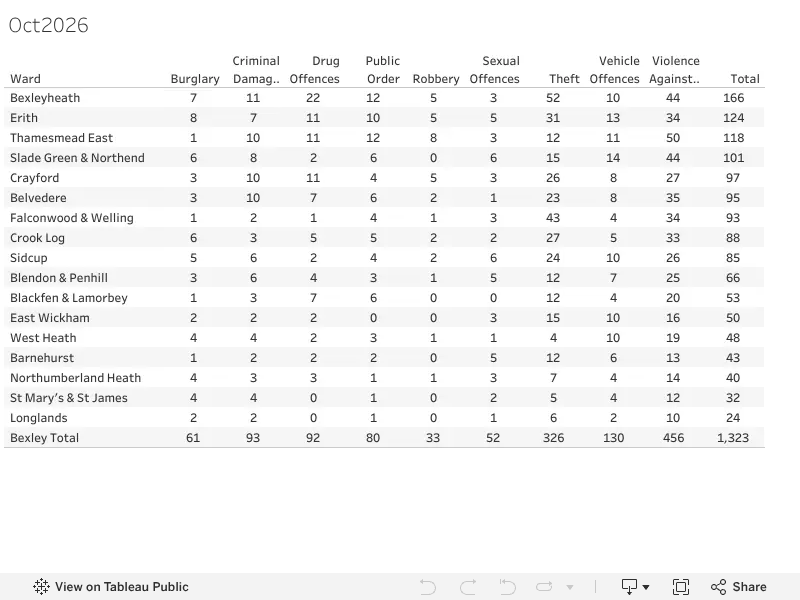
Bexley Crime stats ward summary Oct 2026

Source: Bexley Watch Viz