Thursday, 17 September 2026

Scams to watch out for right now

Stay in the know about scams that are currently targeting people across the UK. Our experts share real examples and telltale signs to look out for, so you can protect yourself.

The latest scams we've spotted include a TV licensing impersonation, a fake PayPal email and fraudsters impersonating the mobile network Three. Check out our full list.

Source: Which? (16 Sep 2026) 

Stay ahead of the phone scammers

Some phone scams can be extremely convincing. For example, fraudsters can spoof phone numbers so it appears you're being called by a trusted contact. They might also have some of your information, such as your name and address.

To help you spot a fake and stay safe, we've rounded up the most common types of phone scams you're likely to encounter. 

Source: Which? (22 Dec 2025) 

Apple account compromised

Our fraud expert, Faye Lipson, spoke to a concerned Which? member about an alarming pop-up message on her iPhone. The message claimed that issues had been detected on her device, which could result in her losing all her data if she didn't take action.

Although it seems worrying, these are often not real pop-ups, but scam ads that appear when using certain apps or sites, designed to spook you into compromising your account. Find out what Faye recommends you do if you see a similar warning.

Source: Which? (17 Sep 2026) 

JustMe scam prevention app

We're sorry if you had problems last week with the testing of the Cifas JustMe scam prevention app. The free trial code was temporarily blocked, but that has now been resolved. If you would like to help with testing the scam identification features on this app, you can download the JustMe app from the Apple App store or Google Play. Search ‘JustMe – Scam Protection’.

For free access, you'll need to open the app and select ‘activate or restore subscription’, then ‘activate with code’ and use the code GCP7ANF3

The trial is for six months, no payment information is collected, and there's no auto-renewal.

Once you've had a go at testing it, you can share your thoughts on the feedback form.

Source: Which? (17 Sep 2026) 

Sunday, 13 September 2026

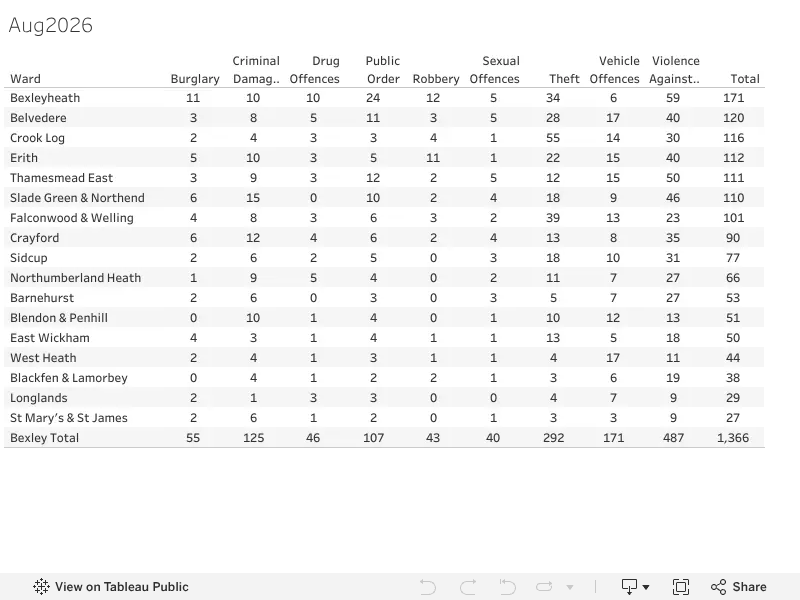
Bexley Crime stats ward summary Aug 2026


Source: Bexley Watch Viz

Thursday, 10 September 2026

Beware screen-sharing scammers posing as banks

Screen-sharing scammers are posing as banks to steal your sensitive information. These scams typically begin with a phone call, where the fraudster attempts to move you to a video call and trick you into sharing your screen with them.

If screen-sharing is enabled, scammers can see what's displayed on your phone, including notifications of one-time passwords sent by banks to authorise payments. Our expert explains how to stop screen-sharing scams and the tactics fraudsters use to con you.

Source: Which? (10 Sep 2026) 

The signs of a recovery scam

Recovery scams are when victims of fraud are retargeted and offered help to recover the money that was stolen from them. The scammers promise to get your money back for a fee, but any money given to them won't be returned.

We've spotted suspicious accounts on social media offering scam advice, but there are a few signs that these are profiles to be wary of and most likely recovery scams in disguise. 

Source: Which? (10 Sep 2026)

Scammers are thriving on Meta's social media platforms

Platforms including Facebook, Instagram and WhatsApp remain squarely at the centre of the UK’s scam epidemic, as our survey of victims has shown.

While the tech giants profit, consumers are paying the price for a relentless wave of fraud. We expose how criminals operate, why reimbursement remains a postcode lottery and why urgent reforms are needed to tackle this crime.

Source: Which? (09 Sep 2026) 

Test the new JustMe scam protection app (via Which?)

We have an exclusive free trial for Which? Scam Alerts subscribers. Cifas, the not-for-profit scam-prevention organisation, needs help with testing its new app JustMe. It allows you to scan for suspicious texts, emails and QR codes, plus other scam-detecting features.

You can download the JustMe app from Apple App store or Google Play. Search ‘JustMe – Scam Protection’.

For free access, you'll need to open the app and select ‘Activate or restore subscription’, then ‘Activate with code’ and use the code GCP7ANF3. The trial is for six months, no payment information is collected and there's no auto-renewal.

Cyber Security Alert: Beware Fake 'Verify You're Human' Screens (ClickFix Scam)

Cybersecurity researchers have highlighted a dangerous cyber attack known as ClickFix, which is currently targetting users across Windows, Mac, and mobile devices.

Unlike traditional viruses that rely on hidden downloads, this scam relies on tricking you into manually installing the malware yourself under the guise of solving a routine web check.

How the Scam Works

  1. You visit a website (often a compromised legitimate site, expired domain, or fake link) and a pop-up appears stating "Verify you are human", "Fix audio driver", or "Sign-in failed".

  2. The page instructs you to follow quick verification steps—typically prompting you to open your system command line (PowerShell on Windows or Terminal on Mac) or press Win + R and paste a provided line of text.

  3. The moment you paste and press Enter, a hidden background script executes. This secretly installs info-stealing malware designed to hijack saved passwords, online banking credentials, and personal files.

How to Prevent This from Happening

  • Golden Rule: No legitimate company—whether Google, Microsoft, Cloudflare, or Meta—will ever ask you to open PowerShell, Command Prompt, or Terminal to prove you are a human or fix a browser issue.

  • Never Paste Unfamiliar Commands: If a website instructs you to press Win + R, paste text into a command terminal, or download an unverified app to view a page, close the browser tab immediately.

  • Beware of Artificial Urgency: Scammers rely on countdown timers and warning messages to trigger panic. Take a moment to think before following unusual instructions.

  • Keep Devices Updated: Ensure your operating system, web browsers, and anti-virus software are fully up to date with real-time web protection enabled.

What to do if you have already fallen for this: Immediately disconnect your device from Wi-Fi/Ethernet, change your key account passwords (email, online banking, social media) from a secondary secure device, and run a full system anti-virus scan or consult an IT professional.


 Source: The Phone Guardian

Wednesday, 9 September 2026

How to Stop Scammers in Their Tracks: Key Lessons from Today’s Channel 5 Broadcast

In today’s episode of Matt Allwright on Channel 5, consumer champion Matt was joined by fraud prevention expert Harleen Nottay to break down the latest tactics fraudsters are using—and, more importantly, how we as a community can protect ourselves.

At Bexley Neighbourhood Watch, keeping our local residents safe from fraud is a top priority. Here is a roundup of the core advice and action points highlighted during today’s show.

1. The Golden Rule: Stop, Challenge, Protect

Scammers rely heavily on creating a sense of urgency—whether they claim your bank account is compromised, a parcel couldn't be delivered, or a family member is in emergency financial trouble.

  • Stop: Take a moment to pause. Legitimate organizations, banks, or police officers will never pressure you into making an immediate financial decision or transferring funds on the spot.

  • Challenge: Ask yourself: Could this be fake? It’s okay to reject or ignore requests for personal information. Only criminals will try to rush or panic you.

  • Protect: If you suspect a contact is fake, report it immediately and contact your bank using the trusted number on the back of your card.

2. Common Scam Tactics Highlighted Today

  • Number Spoofing: Criminals can fake the caller ID displayed on your phone to make it look like your bank or the Metropolitan Police are calling. Tip: Hang up immediately. Wait at least 5 minutes (or use a different phone) to ensure the line is clear, then call the official organization directly.

  • Suspicious Texts (Smishing) & Emails (Phishing): Never click on links in unsolicited messages claiming you owe money or need to update account details.

  • Safe Account Lies: No real bank or police department will ever ask you to transfer money to a "safe account." If someone tells you to do this, it is a scam.

3. Actionable Tips to Protect Yourself & Neighbours

  1. Use the 159 Hotline: If you receive a suspicious call claiming to be from your bank or credit card provider, hang up and dial 159. This secure, national hotline routes you directly to your bank's genuine customer service team.

  2. Report Suspicious Messages:

    • Texts: Forward scam text messages free of charge to 7726 (which spells 'SPAM').

    • Emails: Forward suspicious emails to report@phishing.gov.uk.

  3. Set Up Call Blockers: For elderly or vulnerable relatives in Bexley, consider setting up landline call blockers or checking if their phone provider offers free nuisance-call shielding.

  4. Talk to Your Neighbours: Scammers thrive in isolation. Check in on your neighbours and share these tips. If a crime is currently in progress or someone is at your door, call 999.

Need Further Support?

If you think you have lost money to a scam, contact your bank immediately and report it to Action Fraud or by calling 0300 123 2040.

Stay vigilant, look out for one another, and let's keep Bexley safe!

— Your Bexley Neighbourhood Watch Team

Watchpoint: Stopping Fraud - click to view enlarged


Monday, 7 September 2026

Stay Safe in Our Community: Latest Scams to Watch Out For and How to Protect Yourself

Community Alert: New Fraud Tactics & How to Stay Safe

Criminals are constantly updating their tactics to exploit trust, using artificial intelligence, deceptive phone calls, and high-pressure situations to catch people off guard. To help keep our neighbourhood safe, we have put together a summary of the latest scams circulating across the UK and the simple steps you can take to protect yourself, your family, and your neighbours.

1. AI Voice Cloning & Deepfake Emergency Scams

  • How it works: Scammers use short audio clips or video snippets taken from social media to replicate the voice or appearance of a loved one or authority figure using artificial intelligence. They then contact you claiming there is an urgent emergency — such as a relative being arrested, involved in an accident, or needing immediate bail money.

  • Red Flag: High pressure to transfer funds straight away using untraceable methods like gift vouchers, wire transfers, or cryptocurrency.

2. "Digital Arrest" & Government Imposter Frauds

  • How it works: Criminals pose as police officers, HMRC officials, or UK Border Force agents over video or telephone calls. They claim that you or a family member are linked to a crime and force you to stay on the call (a simulated "digital arrest") until you pay a fine or move money into a fake "safe account".

  • Red Flag: Threats of immediate arrest, being told you must stay on a video call, or demands to transfer money to "protect" your bank accounts.

3. Remote Work & Fake Job Recruitment

  • How it works: Posing as recruitment agencies or tech employers, fraudsters advertise high-paying work-from-home jobs (such as data entry or testing AI systems). After a brief online interview, they ask for money upfront for office equipment or request sensitive bank details under the guise of setting up payroll.

  • Red Flag: Job offers made without a proper face-to-face or official video interview, or requests to buy equipment upfront.

4. Fraud Recovery Scams

  • How it works: Fraudsters specifically target individuals who have previously lost money to a scam. Posing as police officers, legal representatives, or recovery agents, they claim they have recovered the stolen funds and can return them — provided you pay an upfront administrative fee.

  • Red Flag: Any request to pay money in advance to recover previously stolen funds.

5. One-Time Passcode (OTP) Interception Bots

  • How it works: A fraudster attempts to log into your online banking, triggering your bank to text a real security code to your phone. At the exact same time, an automated phone call (a "bot") contacts you pretending to be your bank warning of a security breach, asking you to type that security code into your telephone keypad.

  • Red Flag: Unexpected automated calls asking you to enter security codes you have just received on your mobile phone.

Key Rules to Stay Safe

  • Agree on a Family Password: Set up a memorable, secret word or phrase with relatives to easily verify genuine emergency calls.

  • Take Five & Challenge: If you receive an unexpected call claiming to be from your bank, HMRC, or the police, hang up immediately. Wait five minutes for the line to clear, then call the organisation back using an official number from a bill or website.

  • Never Share Passcodes: Legitimate banks and police officers will never call or text asking for your one-time passcodes, PINs, or banking passwords.

  • Report It: If you suspect a scam or have lost money, report it to Action Fraud online or by calling 0300 123 2040 (or Police Scotland on 101), and inform your bank immediately.

Please share this advice with elderly neighbours, relatives, and friends who may not be online.

N E I G H B O U R H O O D WAT C H C O M M U N I T Y A D V I S O RY (pdf) 

Friday, 4 September 2026

The warning signs of a pension scam

Scams involving pensions are among the most financially devastating types of fraud: victims had an average of £47,000 stolen in 2025, according to Action Fraud.

Common misunderstandings around pension rules could open the door to scammers, who can create highly sophisticated and convincing websites in minutes. We reveal the red flags you should look out for.

Source: Which? (20 Aug 2026) 

How we listed 10 Downing Street on Booking.com

For several years, we've been warning of scams on Booking.com, but they remain rife on the platform. In our latest attempt to test the site's security, we listed 10 Downing Street as a holiday let.

Despite the clearly absurd address, the platform failed to stop our listing from going live, and we were able to take a booking (from our researcher). Find out more about our test and how Booking.com needs to change to prevent scammers on its site.

Source: Which? (04 Sep 2026) 

Why banks refuse subscription trap refunds

Rogue subscription firms are profiting from misleading social media ads and charging for outrageously overpriced services. So, why are card providers blaming customers and denying refunds?

Which? members often ask us for help because they can’t get refunds for these unwanted subscriptions. We explain why getting your money back can be difficult and what to do if you've been caught out. 

Source: Which? (03 Sep 2026) 

Friday, 28 August 2026

The most common WhatsApp scams

Messages promoting a sham service called 'WhatsApp Gold' are recirculating. This scam claims to offer special features to users that can be unlocked by clicking a link – instead, the link leads to malware being downloaded onto your device.

To help you stay protected, our experts have rounded up the most common scams you're likely to come across on WhatsApp, plus tips on how to spot and report them. 

Source: Which? (30 Jul 2026) 

A convincing Apple Pay scam

A wave of fake Apple Pay texts have been reported to Which? in recent months. This convincing scam message tells you that your Apple Pay has been temporarily suspended and asks you to reregister your payment details.

If you add your information, the criminals will quickly enter your card details into their device to set up a new wallet. Find out exactly how this scam works and what to do if you receive one of these texts

Source: Which? (25 Aug 2026)

Investment scams surge

A government-backed campaign to help make investing 'feel more normal, more visible and more relevant to everyday life' is encouraging more of us to invest. But there's also a growing threat of scammers looking to target new investors.

Our fraud expert, Faye Lipson, explains how these scammers operate and some common tactics to watch out for, including an AI-generated Nigel Farage video and fake trading firms. 

Source: Which? (27 Aug 2026) 

Monday, 24 August 2026

Appeal for Witnesses: Daytime Burglary in Our Community

A local resident recently reached out on Nextdoor following a distressing incident in our community. On Wednesday 19th August at around 12:30 pm, a flat was burgled by two men posing as electricians.

Personal items were taken, and the victim is appealing to the neighbourhood for any information or CCTV footage that might help identify those involved.

Details of the Incident

  • Date & Time: Wednesday, 19th August at 12:30 pm

  • Suspect Descriptions: Two men dressed in dark clothing, masquerading as tradesmen.

  • Key Distinguishing Feature: One suspect captured on a doorbell camera entering the block is described as 5ft 6in to 5ft 8in, slim build (around 10–11 stone), with a visible bite mark or scar on the left side of his face.

How You Can Help

  • Check Security Footage: If you live nearby, please review your doorbell cameras, home CCTV, or dashcam footage from around 12:30 pm on Wednesday 19th August for anyone matching this description.

  • Report Information: If you recognize the man described or saw anyone acting suspiciously around the block at that time, please report it to the police via 101 or submit an anonymous tip through CrimeStoppers on 0800 555 111.

Crime impacts the whole neighbourhood, and sharing relevant footage or information can make a significant difference in helping the victim recover lost items and ensuring our streets stay safe. Please keep an eye out and share this appeal with nearby residents.

Source: Nextdoor 

Friday, 21 August 2026

Fact Check: Debunking the 'Home Affairs' Door-to-Door Census Scam Message

If you have recently seen a warning circulating on Nextdoor, WhatsApp, or Facebook about fake "Home Affairs Officers" collecting fingerprints and photos for an upcoming census, you are not alone. The notice warns residents that thieves with laptops and biometric readers are posing as officials to break into homes.

However, you can rest easy: this viral post is a hoax.

Where Did the Hoax Come From?

This message first surfaced around 2017 in South Africa, where the national government does indeed include a "Department of Home Affairs". Over the years, the exact text has been copy-pasted across North America, Australia, and the UK without modification.

How to Spot Why It Doesn't Apply to the UK:

  • Incorrect Terminology: The UK government uses the Home Office, not the "Home Affairs Department".

  • No Biometric Census: Official UK censuses are managed by the Office for National Statistics (ONS). Government field officers will never ask to capture your fingerprints or take your photograph on your doorstep.

  • Chain Mail Dynamics: The post ends with classic viral chain-letter phrases urging you to "Send this to all your community groups."

How to Handle Doorstep Safety

While this specific message is fake, staying vigilant about genuine doorstep callers is always sensible practice:

  • Always check ID: Genuine officials carry official photo identification and will never mind waiting outside while you verify their details.

  • Use a door chain: Speak to unknown callers through a window or with a door chain engaged.

  • Report suspicious activity: If someone is acting suspiciously at your door, report it to Action Fraud or call 101 (or 999 in an emergency).

Instead of forwarding the hoax warning, feel free to share this article with your local neighborhood groups to set the record straight!

Fake hoax scam warning


https://bexleywatch.blogspot.com/2026/03/working-together-for-safer-bexley.html

Scams to watch out for right now

Stay in the know about scams that are currently targeting people across the UK. Our experts share real examples and telltale signs to look o...