Thursday, 19 February 2026

How to spot a WhatsApp scam

Messages promoting a sham service called 'WhatsApp Gold' are recirculating. This scam claims to offer special features to users that can be unlocked by clicking a link – instead the link leads to malware being downloaded onto your device.

To help you stay protected, our experts have rounded up the most common scams you're likely to come across on WhatsApp, plus their tips on how to spot and report them. 

Source: Which? (10 Feb 2026) 

App store scam warning

Fraudulent apps have been found on Apple's App store, using a legitimate company's identity to bypass security checks and attempt to harvest people's personal data.

We examined the scam apps and explain what checks you should do to avoid downloading one to your device. 

Source: Which? (18 Feb 2026) 

Don't get conned on Booking.com

Our scams expert, Faye Lipson, spoke to a Booking.com customer who paid around £860 to book a villa in Malta, which turned out to be a fraudulent listing.

Booking.com promised to refund them, but after seven months of trying to get their money back, the customer was still out of pocket. Find out what happened when Faye stepped in, plus how to protect yourself against holiday scams.

Source: Which? (19 Feb 2026) 

Local Priorities House burglary Message

I wanted to provide you with an update regarding House burglary, which people around your area have highlighted as an issue of concern on the priority survey.

Dear Residents of Joydens Wood. To make you aware there was unfortunately a Burglary on Joydens Wood Road on 18/02/2026 at approximately 17:00. Also in the early hours of 19/02/2026 there was an Attempted Burglary on Brackendene where the offenders were scared off by a barking dog. Please remain vigilant in the area and report any suspicious behaviour to Police

A police investigation is currently taking place in relation to these two incidents.

Burglary is a particularly invasive crime that can have a lasting impact on victims. If you have been a victim and need support and help, you should have been offered the services of Victim Support. You may have declined at the time, or not noticed the offer, but can refer yourself at any time by either calling 0808 168 9111 or visiting their website www.victimsupport.org.uk

Burglars do not want to get caught, so taking action to make your home or business premises safe and less attractive to thieves can go a long way to reducing the risk.

Not all advice, or security products recommended are the same, or necessarily fit for purpose. 

If looking to take positive action to prevent yourself from being a victim of this type of crime, help and advice can be found on the Neighbourhood Watch website.

If you ever experience this issue or have information regarding an incident, please report it using our online reporting tools at https://www.kent.police.uk, speak to an operator in our Force Communications Room via our online web chat or call the non-emergency number 101.

Alternatively, you can stay 100 per cent anonymous by contacting the independent charity Crimestoppers on 0800 555 111 or via their untraceable online form at crimestoppers-uk.org.

Get Involved

Please consider getting involved by registering for these messages, this will enable you to contribute to the local priority survey.  We may be unaware of issues that you would like us to focus on.  Take a few minutes to securely and privately register and have your say using the button below, this will mean we can focus on things that matter to you. 

Source: https://www.mycommunityvoicekent.co.uk/Alerts/A/401417/Local-Priorities-House-burglary-Message

Friday, 13 February 2026

Bexley SNT – Successful Execution of Two Section 8 PACE Warrants – Erith Industrial Estate

On Thursday 12 February 2026, officers from Bexley Safer Neighbourhoods Team executed two Section 8 PACE 1984 warrants at separate units on an industrial estate in Erith.

These warrants were carried out in partnership with the Environment Agency, HMRC, London Fire Brigade, DNA Selector Dog teams, and BT’s cable theft unit, reflecting a strong multi-agency approach to tackling organised criminality.

Following extensive searches across both premises, officers recovered:

  • One stolen vehicle, and a second vehicle that had been stripped for parts.
  • Approximately £35,000 worth of Class A and Class B drugs, indicating clear evidence of drug supply activity.
  • Three individuals were arrested at the scene, and enquiries remain ongoing.

    In addition, two of the buildings were found to present significant ongoing criminal and safety concerns. As a result, both have been issued with Closure Notices and will remain closed for a period of three months.

    This operation demonstrates the continued commitment of Bexley SNT and partner agencies to disrupting organised criminality, targeting local priorities, protecting communities, and improving safety across the borough.

    Source: https://www.metengage.co.uk/Alerts/A/398364/Bexley-SNT--Successful-Execution-of-Two-Section-8-PACE-Warrants--Erith-Industrial-Estate 

    Thursday, 12 February 2026

    Which? latest scam warnings

    Which? dedicated team of fraud experts are always on the lookout for scams targeting people across the UK.

    Recent tactics to be aware of include a fake Daily Mail website, a dodgy message circulating on WhatsApp and fraudsters posing as Which? on social media. Check out the full list, based on your reports to our Which? Scam Action Alerts Facebook community and scam sharer tool.


    Source: Which? (11 Feb 2026)

    5 signs of a romance scam

    Report Fraud received 12,093 reports of dating scams in the past 13 months, with losses totalling £119.6m. This type of fraud, where scammers aim to trick people into fake relationships, can have a huge emotional and financial impact.

    Our experts have laid out five signs of a romance scammer, including how to spot stolen images online and the tactics these fraudsters use to build a connection with potential victims.


    Source: Which? (12 Feb 2026)

    How to avoid AI scams

    An AI scam uses artificial intelligence to trick you into parting with your money. Deepfake videos, where a person has been digitally altered to appear as a different person, and AI-generated text are just two ways this technology can be used by fraudsters.

    Essentially, AI makes scams more convincing and harder to spot, so make sure you're familiar with these new methods and stay one step ahead of the scammers.


    Source: Which? (10 Feb 2026)

    Monday, 9 February 2026

    How we are tackling e-bike crime in Bexley

    Over the last few months, we have been talking to Londoners at our community crime fighting events, to better understand exactly what issues you care about most, including here in Bexley. 

    Across London, including in Bexley, we heard of widespread concerns about dangerous riding, anti-social behaviour and thefts linked to e-bikes and e-scooters.  

    So, we are stepping up our action. 

    In the past year, we have taken over 2,500 illegal and unsafe e-bikes and e-vehicles off London’s streets. Through precision-led policing driven by intelligence, data and technology, we are seizing thousands of dangerous rides where they’re being used unlawfully or anti-socially.  

    We are working with partners to develop evidence-based, targeted interventions and operations that will lead to effective, long-term change. 

    Acting on concerns that matter most to Londoners is at the heart of our community crime-fighting – and so we need your input. 

    Help us keep our streets safe and click the link below to fill in a short survey: 

    https://survey.metengage.co.uk/Survey/GUID/c2c1fffd-0a6e-491e-b542-bd1782e2b772

    NOTE: Please use the URL copied above only.

    We would appreciate hearing from you to help us better understand both the concerns and benefits of e-bikes and e-scooters use in your area. This will help us understand what you would like us to prioritise and give us insight to take to partners and drive action.  

    MPS actions so far in BEXLEY: 

    In the meantime, we want to take this opportunity to tell you what we are already doing to clamp down on the illegal and anti-social behaviour concerns you raised about e-bikes / e-scooters.  
    Across 2025 we seized more than 2,500 illegal e-bikes and e-scooters across London and will continue to take steps to keep you safe. 
    We are stopping riders suspected of being under the influence of alcohol or drugs. Drunk riding is illegal, unsafe, and contributes to a growing proportion of near-misses and collisions, particularly on increasingly used high-powered e- bikes. 
    This has included operations in Proactive operations to deal with E Bikes on Bexleyheath Broadway. 
    Proactive Operations to deal with fast food E bikes in Welling High Street and Sidcup 
    Retail Visits with Bike shops to discuss good sale agreements. 
    Proactive Operations to target ASB with E bikes in Crayford

    Source: https://www.metengage.co.uk/Alerts/A/395843/How-we-are-tackling-e-bike-crime-in-Bexley

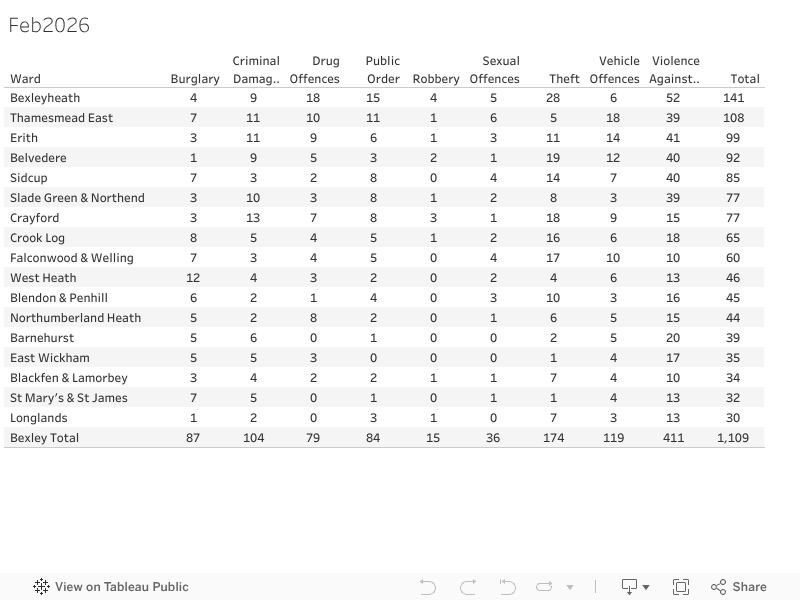
    Bexley Crime stats ward summary Jan 2026

    Source: Bexley Watch Viz

    Friday, 6 February 2026

    Warning: The 'Cloud Data Deletion' Scam Hitting UK Inboxes


    Have you recently received an urgent email claiming your "Cloud+" membership has ended and your photos are at "immediate risk of deletion"? Before you rush to update your payment details, take a deep breath.

    It is a total scam.

    Cybercriminals are currently sending out highly polished emails designed to look like official correspondence from Apple or other cloud providers. Their goal? To steal your banking information.

    How to Spot This Scam

    Even though the email looks professional at first glance, there are several "red flags" that give it away:

    • The 'From' Address is Wrong: In the screenshots above, the sender's email is a random address (.emudas@bestquotedirect.com). Official emails from Apple or Google will always come from their verified domains (e.g., @apple.com or @google.com).

    • Artificial Urgency: Scammers want you to panic. They use phrases like "immediate risk" and give you a deadline of "tonight at 11:59 PM." Real companies give you a grace period of weeks, not hours, if a payment fails.

    • Vague Greeting: Notice the email says "Dear user" instead of your actual name. Most legitimate services you pay for will address you by the name on your account.

    • Dodgy Footer Information: If you look at the bottom of the email, it lists a random company address ("Design Studio Fabrics" in the US). This has nothing to do with cloud storage!

    What Should You Do?

    1. Do NOT click the link: The "Update Payment" button will lead to a fake website designed to harvest your card details.

    2. Check the official app: If you are worried, go directly to your phone's Settings or the official website of your provider. Check your subscription status there.

    3. Report it: In the UK, you can forward suspicious emails to the National Cyber Security Centre (NCSC) at report@phishing.gov.uk.

    4. Delete and Block: Once you’ve reported it, delete the email and block the sender.

    "I've already clicked and entered my details—now what?"

    If you have already entered your details into the link, you must act fast:

    • Contact your bank immediately. Tell them you have been the victim of a phishing scam. They can freeze your card and protect your account.

    • Change your passwords. If the scam site asked for your login details, change your password for that service (and any other accounts that use the same password) right away.

    Stay safe online—if an email feels like it's trying to scare you into acting, it's usually because it's a scam.

    Thursday, 5 February 2026

    Amazon product recall scam

    A sneaky text message scam claims to be from Amazon and provides a refund link for a product that has been recalled.

    We examined a version of this message and found that the link directs you to a live website that's a convincing copy of Amazon's official page. Discover what this scam looks like and how you can avoid it.

    Source: Which? (04 Feb 2026) 

    Beware new voice cloning phone scams

    National Trading Standards has identified a worrying new scam. It starts with a cold call, where a fraudster asks you to participate in a non-existent 'lifestyle survey', created to gather your personal details.

    While you answer the questions, this information is used to create an AI-generated replica of your voice (voice cloning), which can be used to set up direct debits without you knowing. Find out more about this new scam and how you can protect yourself.

    Source: Which? (05 Feb 2026) 

    4 energy scams to know about

    Whether it's impersonating energy suppliers or flogging fake devices that claim to save you money on your energy bills, scammers bank on rushing you into handing over information by sounding official.

    Energy scams are prevalent throughout the year, but in the winter months they can be just convincing enough to catch people out. Take a look at some of the most common examples we've seen recently.

    Source: Which? (05 Feb 2026) 

    Monday, 26 January 2026

    Scam Alert: New NHS Prescription Phishing Scam Sweeping Inboxes

    It’s the start of the week, and scammers are already hard at work trying to exploit our trust in the NHS. We’ve seen a surge in a particular phishing email today that claims to offer a "simple" way to order NHS prescriptions online.

    While the NHS does offer legitimate digital services, this specific email is a malicious scam designed to steal your personal information or financial details. Here is what you need to look out for.


    The Anatomy of the Scam

    The email, which often carries the subject line "TR: Save Time on NHS Medications IT," looks professional at a quick glance, but several red flags reveal its true nature:

    • Suspicious Sender Address: The email claims to be from "UK Pharmacy Subscription Notice IT," but the actual email address is a random string of characters from a Hotmail account (avrom-158jerrold_145.carter@hotmail.com). Official NHS communications will always come from an @nhs.net or @nhs.uk domain.

    • Vague Branding: While it mentions "NHS Prescriptions," the layout is generic. It lacks the official NHS logo, a registered pharmacy name, or a physical address—all of which are legal requirements for UK pharmacies.

    • Urgency and Convenience: Phishing scams often use "Save Time" or "Register Now" buttons to rush you into clicking before you’ve had a chance to think.

    • The "Unsubscribe" Trap: In many of these emails, even the "Unsubscribe" link is a trap used to verify that your email address is active, leading to even more spam.


    Why is this dangerous?

    If you click the "Register Now" button, you will likely be taken to a spoofed website that looks like an NHS login page. Scammers use these sites to harvest:

    1. Your NHS login credentials.

    2. Personal details (Name, DOB, Address).

    3. Payment information for "delivery fees" or "pre-payment certificates."


    How to Stay Safe

    • Don’t Click: If you receive this email, do not click any links and do not download any attachments.

    • Check the Sender: Always tap or click on the sender's name to see the full email address. If it’s a personal account (like Hotmail, Gmail, or Outlook), it is a scam.

    • Use Official Channels: To order prescriptions online safely, always use the official NHS App or the website of a well-known, high-street pharmacy you trust.

    • Report It: You can forward suspicious emails to the National Cyber Security Centre at report@phishing.gov.uk.

    Stay vigilant and share this with friends or family members who might be less tech-savvy. Scammers rely on us being in a hurry—taking thirty seconds to check the sender's address can save a lot of heartache.


    How to screen calls and avoid scams

    You don’t need extra apps or technical know-how to fight scam calls, as your smartphone already has features designed to stop them.


    If you own an Android, you can use Google Assistant to screen calls automatically. Similarly, iPhone users can try Apple's Call Screening feature. Our tech expert Tom Morgan talks you through how to do this, step by step – and he has tips for landlines, too.

    If you'd benefit from 1-to-1 help with your smartphone or other tech products, you can join Which? Tech Support and chat to our friendly experts on the phone or by email, as often as you need. Find out more about what a membership offers and get a £20 Richer Sounds gift card if you join by 2 February. 

    Source: Which? (22 Jan 2026)

    Getting rid of a PC? Keep your data safe

    If you're getting rid of an old Windows 10 computer, make sure you completely wipe your data. Otherwise, your personal files, passwords and photos could fall into the wrong hands.

    We take you through the process of resetting your Windows 10 PC while keeping your files and data safe and secure – it's easier than you might think.

    Source: Which? (21 Jan 2026)

    Password reset emails: how to tell if they're genuine

    Instagram users are receiving emails from the platform telling them to reset their passwords. And because users didn’t request password changes, the emails have prompted worry and confusion.

    We investigated the emails and found this particular instance to be genuine. Our advice if you receive an email like this: log in to your account via the platform’s official website or app and change your password that way.


    Source: Which? (22 Jan 2026)

    Thursday, 22 January 2026

    Community Event: Tackling Violence Against Women and Girls in Slade Green

    Community Event: Tackling Violence Against Women and Girls in Slade Green


    The Bexley Community Safety Partnership (BCSP) is inviting all residents and regular visitors of Slade Green to a vital engagement forum focused on the safety of women and girls in our community.

    This is a dedicated space for you to voice your concerns, ask questions, and hear directly from the people responsible for keeping our streets safe. Whether you have specific safety concerns or simply want to learn more about the work being done in your area, your presence is highly valued.

    Event Details

    • Date: Wednesday 28th January 2026

    • Time: 5:00pm – 8:00pm

    • Location: Orchard House, Orbit Hub, Slade Green, DA8 3PY

    • Suitability: Families and children are more than welcome to attend.

    Why should you attend?

    This forum is a collaborative effort bringing together key local figures and organisations, including:

    • The Police

    • Bexley Council

    • Local Services

    • Your Ward Councillors

    The evening is designed to be an open dialogue where you can obtain practical information and advice on gender-based safety, stay informed about ongoing local initiatives, and ensure that the voices of Slade Green residents are heard at a leadership level.

    Find out more

    For further information regarding the work being done to combat violence against women and girls (VAWG) in Bexley, please visit the official website: 👉 www.bexley.gov.uk/vawg

    Scam Alert: Don’t Fall for the "Pharmac4U" Prescription Phishing Email

    Scam alert: "Pharmac4U" Prescription Phishing Email

    There is a new phishing email circulating in the UK targeting people who manage their NHS prescriptions online. Using the names of well-known services like Pharmacy2U, scammers are trying to trick patients into clicking a malicious "Register" button.

    Here is what you need to look out for to keep your data safe.

    The Red Flags: How to Spot the Fake

    Looking at the screenshot provided, there are several immediate "tells" that this is a scam:

    • The Sender Address: While the name says "Repeat Prescriptions UQ," the actual email address is a random Hotmail account (jecho_jed@hotmail.com). A legitimate NHS-affiliated service would use an official domain (e.g., @nhs.net or @pharmacy2u.co.uk).

    • Inconsistent Branding: The header of the email says "Message from Pharmac4U," but the body text mentions "Pharmacy2U." This inconsistency is a major red flag; professional companies do not get their own names wrong.

    • Generic Language: The email uses broad, generic phrases like "Skip the pharmacy queues." While Pharmacy2U is a real, registered service, scammers often "spoof" their name to gain your trust.

    • The "Register" Button: This is the trap. Clicking this button likely leads to a fake website designed to harvest your name, address, date of birth, and potentially your GP details or payment information.

    Why This Scam is Dangerous

    Because many of us legitimately use online pharmacies to manage repeat prescriptions, an email like this can look "normal" at first glance. Scammers rely on us being in a hurry and clicking without checking the sender’s details.

    How to Protect Yourself

    1. Check the Sender: Always tap on the sender's name to see the full email address behind it. If it looks like a personal account or a string of random letters, delete it.

    2. Go Direct: If you want to register for an online pharmacy, never click a link in an unexpected email. Instead, type the address directly into your browser (e.g., www.pharmacy2u.co.uk) or use the official NHS App.

    3. Look for Typos: Misspellings like "Pharmac4U" are deliberate or careless mistakes that legitimate companies rarely make.

    What to Do if You Receive This

    • Do Not Click: Don’t click the "Register" button or any links within the email.

    • Report It: You can forward suspicious emails to the Suspicious Email Reporting Service (SERS) at report@phishing.gov.uk.

    • Delete: Once reported, delete the email and empty your trash folder.

    Stay vigilant and share this with friends or family members who might be expecting a prescription notification!

    Monday, 19 January 2026

    Blue Badge Holders: Unlocking Free Passage Through Blackwall & Silvertown Tunnels (A Guide to the Exemption Process)

    Let's be honest, navigating London's road charging schemes can feel like a labyrinth, and the new Silvertown Tunnel joining its older sibling, Blackwall, means even more to consider. For Blue Badge holders, there's a valuable 100% exemption available, but the application process can sometimes feel a bit… well, let's just say "unnecessarily complicated."

    Many Blue Badge holders, or those who drive them, run into a snag trying to link the exemption to their existing London Road User Charging account. The common frustration? TfL's system is quite particular about whose name is on the account when applying for this specific discount.

    The Golden Rule: The Blue Badge Holder is the Account Holder

    Here's the crucial takeaway that often catches people out: The 100% discount for Blue Badge holders must be applied for through a London Road User Charging account set up IN THE NAME OF THE BLUE BADGE HOLDER.

    It doesn't matter if you're the main driver, the spouse, or the family member managing all the household bills. For this specific exemption, TfL needs to see the Blue Badge holder's name as the primary account holder.

    Why This Confusion Happens

    Often, people try to add the Blue Badge holder's details as a "secondary user" or try to upload the badge onto an account already registered in someone else's name (e.g., the driver's). The system, designed to prevent fraudulent use of Blue Badges, sees this mismatch and will likely reject the application, asking for the details to be submitted by the main account holder – which isn't possible if the main account holder isn't the Blue Badge holder!

    Your Step-by-Step Guide to a Smooth Application

    To ensure a fuss-free exemption for the Blackwall and Silvertown tunnels, follow these steps:

    1. If You've Already Applied Incorrectly:

      • You'll likely receive a rejection and a refund of the £10 registration fee. Wait for this to process. Trying to push it through will only delay things.

    2. Create a BRAND NEW Account (in the Blue Badge Holder's Name):

      • Go to the official TfL London Road User Charging website.

      • Crucially, start a new registration process using the full name and date of birth of the Blue Badge holder. This is paramount.

      • You can use your own email address if you manage their affairs, but the personal details must match the Blue Badge.

    3. Apply for the "Blue Badge 100% Discount":

      • Once the new account is active, navigate to the exemptions/discounts section.

      • Select the "Blue Badge" exemption.

      • Upload Clear Photos: You'll need to upload clear, legible photos of both the front and back of the Blue Badge.

      • Proof of ID: You'll also need to provide proof of identity for the Blue Badge holder (e.g., passport, driving license). Ensure the name on the ID matches the Blue Badge and the new account.

      • Pay the £10 Registration Fee: This is a one-off fee, not an annual charge.

    4. Register Your Vehicle(s):

      • Once the Blue Badge exemption is approved (TfL will notify you, usually within 10 working days, but sometimes quicker), you can register up to two vehicles on this account.

      • Add the vehicle(s) that the Blue Badge holder will be travelling in when using the tunnels.

      • Important: Once your vehicle(s) are linked to an active Blue Badge exemption, they will be recognised by the tunnel ANPR cameras as exempt.

    5. Managing the Account (Optional):

      • If you're the primary driver or manager, you can add yourself as an "Authorised User" to the Blue Badge holder's account. This allows you to manage payments, check exemptions, and receive notifications.

      • If you had the exempt vehicle on your own Auto Pay account, it's a good idea to remove it once the Blue Badge exemption is confirmed. While the exemption should override any charges, it simplifies things and avoids potential confusion.

    In Summary

    While the system might seem a bit convoluted, remember that it's designed to protect the integrity of the Blue Badge scheme. By setting up the account directly in the name of the Blue Badge holder, you're aligning with TfL's requirements and paving the way for smooth, charge-free journeys through the Blackwall and Silvertown Tunnels.

    there are several relevant links on the TfL website. Because the Blackwall and Silvertown tunnel charges are part of the same system as the Congestion Charge, you use the same "Blue Badge 100% Discount" application process.

    ----------------------------------------------------------------------------------------

    The most important link for you is the "Before you begin" page, which explicitly states that an account must be in the Blue Badge holder's name.

    1. The Main Application Page

    2. If You are Applying for Someone Else

    If you are managing the account for the Blue Badge holder, TfL provides a specific page for "proxy" applications:

    3. General Information on Tunnel Charges & Exemptions

    • TfL: Paying the Blackwall and Silvertown Tunnels Charge

      • This page confirms that Blue Badge holders receive a 100% discount but must be registered with TfL to get it. It also explains that if you already have an active Blue Badge discount for the Congestion Charge, it will automatically apply to the tunnels.

    Summary of What You Need to Upload:

    When you create the new account in the Blue Badge holder's name and apply via the links above, you will need:

    • Both sides of the Blue Badge.

    • Proof of Identity (one of: Passport, Driving Licence, Birth Certificate, or a Pension/Benefit letter less than 7 months old).

    • Authorisation Form (if you are the one applying on their behalf).

    Tip: Once the new account is approved, you can add up to two vehicles to it. Once added, those vehicles are "whitelisted" by the cameras and you won't need to do anything else when driving through the tunnels.

    Friday, 16 January 2026

    Scamarama: Don’t Let Fraudsters Take the Reins of Your Screen

    In an age where we do almost everything online, scammers are finding more invasive ways to get to our hard-earned money. One of the most effective methods currently doing the rounds is the screen sharing scam.

    The Financial Conduct Authority (FCA) is urging consumers to stay vigilant. But what exactly are these scams, and how can you spot the red flags before it’s too late?


    What is a Screen Sharing Scam?

    A screen sharing scam is a tactic used by criminals to view your private information or gain direct access to your bank accounts. By convincing you to share your screen, they can watch you type passwords, access sensitive documents, and even initiate money transfers right in front of your eyes.

    Criminals often initiate contact in several ways:

    • Out of the blue: Direct messages on social media or unexpected phone calls.

    • Search Engine Traps: Fake contact details for legitimate companies or "too good to be true" investment opportunities appearing in search results.

    The "Helpful" Hustle

    Once they have you on the line, the scammer will try to build trust. They might pose as a helpful technician, a banking official, or a savvy investment broker.

    To "help" you, they will ask you to download legitimate software—tools you may have used for work or to chat with family, such as AnyDesk, Microsoft Teams, TeamViewer, or Zoom. Because the software itself is reputable, many people feel a false sense of security.

    The Golden Rule: The scam can only happen if you download the software and grant them control. Once they’re in, your personal information and financial accounts are an open book.


    Red Flags to Watch Out For

    • Unsolicited Contact: If a firm or individual contacts you out of the blue, treat it with extreme suspicion.

    • The Screen Share Request: No legitimate financial firm will ever ask to remotely access your computer or phone to process an investment or help with a banking issue.

    • High Pressure: Scammers use "ticking clock" tactics to make you act before you think.

    • Unrealistic Returns: If an investment opportunity sounds too good to be true, it almost certainly is.


    How to Protect Yourself

    1. Never Share Your Screen: Even if you were the one who searched for the company online, never grant remote access to your device.

    2. Verify via the FCA: Only deal with financial services firms authorised by the FCA. Use the FCA Firm Checker to confirm their status.

    3. Use Official Contact Details: If you need to speak to a firm, only use the phone number or email address listed on the FCA Firm Checker—not the details provided in an email or by a caller.

    4. Check the Warning List: Consult the FCA Warning List to see if a company is known for operating without authorisation.

    If Things Go Wrong

    If you suspect you’ve been targeted or have already shared your screen, take action immediately:

    • Report it: Contact the FCA on 0800 111 6768 or via their online contact form.

    • Alert your bank: If you've shared access, call your bank immediately to freeze your accounts.

    • Watch for "Recovery Scams": Fraudsters often sell victim lists to other criminals. Be wary of follow-up calls claiming they can recover your lost money for a "small fee"—this is simply the next phase of the scam.

    Before making any big financial moves, consider getting independent advice from MoneyHelper or exploring the FCA’s InvestSmart pages to help you stay in control of your money.

    3 phone scams to watch out for right now

    The average person in the UK receives eight scam calls a month. Some of the most common ones will impersonate your bank in a bid to convince you that your account has been compromised. But any cold call should be treated with extreme caution, as scammers can be incredibly convincing.

    Take a look at three that are currently doing the rounds and read our expert tips on how to stay safe.

    Source: Which? (14 Jan 2026) 

    Our latest scam warnings

    Our dedicated team of fraud experts are always on the lookout for scams targeting people across the UK.

    Recent tactics to be aware of include an EE points scam and a dodgy NatWest email. Check out the full list, based on your reports to our Which? Scam Action Alerts Facebook community and scam sharer tool. 

    Source: Which? (12 Jan 2026) 

    5 holiday rental rip-offs to watch out for

    Falling victim to a holiday booking mishap could leave you out of pocket or scrambling for somewhere else to sleep at the last minute.

    We’ve shared the five biggest accommodation rip-offs – from fake listings to double bookings. Some are scams, others are booking errors – but all of them have the potential to ruin a much-anticipated trip away. 

    Source: Which? (07 Jan 2026) 

    Thursday, 15 January 2026

    House fire – Bexleyheath 🔥

    Firefighters are sharing their candle safety advice after a house fire on Northall Road in Bexleyheath.  

    Part of the ground floor of a semi-detached house was damaged by fire. There were no reports of any injuries. 

    The fire is believed to have been accidental and caused by an unattended candle too close to combustible items.    

    A London Fire Brigade spokesperson said: "Candles are one of the most common causes of fires in the home and you should be careful when using them.  

    "This is a timely reminder to never leave candles unattended and keep them away from anything that could catch fire such as curtains, furniture or clothes.  

    "We recommend swapping traditional candles for LED flameless ones as they are much safer, but if you do use real candles, follow our simple safety tips.  

    “Firefighters recommend that you have a look at our online Home Fire Safety Checker to make sure there are no hidden hazards in your home.     

    “The online tool will ask you a series of questions that will help us work out the level of risk in your home, or the home of someone you care for. It only takes a few minutes to get tailored advice to keep yourself and loved ones safe from fire.” 

    The Brigade’s Control Officers were called at 1242 and sent four fire engines and around 25 firefighters from Bexley, Erith and Plumstead fire stations to the scene. The fire was under control by 1355.

    Source: LFB (10/01/2026)  

    Tuesday, 13 January 2026

    🛡️ Stay Connected: Join the Bexley Borough Neighbourhood Watch Today

    As we move forward into 2026, our mission remains clear: to build a safer, more vigilant community across the entire Borough of Bexley. To help us achieve this, we have streamlined how you can receive alerts and report local activity.

    Whether you live in Sidcup, Erith, Bexleyheath, Welling or Crayford, your participation makes our borough stronger.

    Two Simple Ways to Join & Stay Alert:

    1. Visit our Digital Hub Click the link below to access our official Linktree. From here, you can sign up for the blog, report concerns, or subscribe to regular safety alerts across the borough: 👉 linktr.ee/bbnwa

    2. Scan the QR Code If you are viewing this on a desktop, simply open your phone’s camera and point it at the QR Code in our sidebar. It will take you directly to our sign-up and reporting tools.


    Scan QR code or visit inktr.ee/bbnwa


    Why Join the BBNWA?

    • Borough-Wide Alerts: Stay informed about incidents or scams targeting residents across all of Bexley.

    • Direct Reporting: Quick access to the right channels for reporting non-emergency concerns.

    • A Unified Network: A watched street is a safer street. Join thousands of your neighbours in keeping our borough secure.

    Remember: If you see something, say something. Use our Linktree hub to stay vigilant and stay connected.

    — The BBNWA Team

    Bexley Crime stats ward summary Dec 2025

    Source: Bexley Watch Viz

    https://bexleywatch.blogspot.com/2026/01/stay-connected-join-bexley-borough.html

    How to spot a WhatsApp scam

    Messages promoting a sham service called 'WhatsApp Gold' are recirculating. This scam claims to offer special features to users that...