Tuesday, 30 September 2025

URGENT SCAM ALERT: Text Claiming to be from DWP Regarding 'Winter Allowance Scheme' is a HOAX

Please be aware of a highly deceptive text message scam currently circulating that falsely claims to be an "Official Notice" from the DWP (Department for Work and Pensions) & Department for Pensions.
 

The scam is designed to look like a genuine announcement for the "2025-2026 Winter Allowance Scheme" and promises recipients a one-time energy allowance of £200–£300. It then claims that "System records indicate that you have been included in the list of eligible applicants."

This message is fraudulent. Do not click the link or reply to the message.

Key Red Flags That Expose This as a Scam

If you receive this text, here are the major clues that it's a scam:

  1. The Sender's Number is Foreign: The number shown in the screenshots, +63 950 500 6816, uses the +63 country code, which is the code for the Philippines. A genuine official notice from the DWP would never come from a foreign mobile number. Official government communications will usually come from a short code or a number that identifies them as a UK government service.

  2. The Link is Not a Genuine Government URL: The provided link is https://gov-dwpqtup.top/uk. While it tries to look official by including "gov-dwp," a genuine UK government website link must end in .gov.uk (e.g., www.gov.uk). The use of a random or unfamiliar domain like .top is a clear sign of a scam.

  3. Unusual Language and Instructions: The text uses slightly awkward phrasing, and the instruction to "reply with 'Y', then exit the message and reopen it to activate the link" is an unusual and completely unnecessary step for legitimate government communication.

  4. Suspicious Timing/Scheme Name: While the DWP does administer the Winter Fuel Payment and has offered various cost of living payments, they would not be announcing a major new "2025-2026 Winter Allowance Scheme" via a text message from a foreign number with a non-government link.

What to Do If You Receive This Text

  • Do NOT Click the Link: The link is designed to steal your personal information, bank details, or install malicious software (malware) on your phone.

  • Do NOT Reply: Replying confirms to the scammers that your phone number is active and they will likely target you with more scams.

  • Report the Text:

    • Forward the message to 7726. This is a free-of-charge service provided by mobile phone operators to report spam texts. The number spells out "SPAM" on a keypad.

    • You can also report the scam to Action Fraud online or by calling 0300 123 2040.

  • Delete the Message: Once you have reported it, delete the text immediately.

Remember, the DWP will never ask for your personal or financial information by text message or email. If you are ever unsure, search for the official government website and log in directly, or call the official DWP helpline. Never use a link provided in an unsolicited message.

Please share this alert with friends and family, especially those who may be expecting a genuine payment this winter. Stay safe online!


Disclaimer: This post is for informational purposes only. Always use official government channels to verify information.

DWP scam alert

DWP scam alert


Friday, 26 September 2025

6 signs your computer has been hacked

If your computer has started running slowly or showing error messages, it could simply be due to age. However, the worst-case scenario is that your device has been compromised, putting your personal data at serious risk from fraudsters.

Our tech experts break down the warning signs to look out for and give their tips to keep your data safe from hackers.

Source: Which? (25 Sep 2025) 

Is it worth paying for antivirus?

The basic job of security software is to passively stand guard, protecting your devices against malicious software (known as malware) that can leave you vulnerable to scams and other criminal activity.

But is paid antivirus protection any better than free software? We explain why our lab tests show that there isn't as much difference as you might think. To see which free software gets our Best Buy recommendation, you can get 50% off a Tech Support annual membership until 30 September. 

Source: Which? (25 Sep 2025) 

Subscription traps: question-and-answer services with a sting

Online question-and-answer services can appear at the top of search engine results, promising to connect you with ‘verified experts’, yet reports to Which? suggest they are little more than costly subscription traps.

Howly and JustAnswer tempt you with a small charge initially – as little as £1 – but if you miss the small print, you'll face recurring monthly payments of up to £50. Discover what we found in our investigation into these schemes.

Source: Which? (24 Sep 2025) 

Monday, 22 September 2025

Student safety: protect young people from fraud and cyber crime

Students can be a prime target for fraud and cyber crime. Whether you're banking, browsing, shopping, dating, gaming, or sharing content on social media, it’s crucial to take steps to protect yourself. Follow these steps to secure your personal and financial information.

Job Application Fraud


Students looking for job opportunities can be targeted by fraudulent adverts aimed at stealing personal information or money. Students might be asked for an upfront payment for a fake consultation or extra help finding a job, but the fraudster does not deliver. Stay safe by:

  • Fraudsters will often use fake job adverts and impersonate legitimate companies to lure job seekers. Always do some research to check that you’re dealing with a genuine employer.  

  • A legitimate employer or agency will not ask you for money to work for them. 

  • Look out for job offers that claim they can make you rich quickly and offer incredibly high salaries for very few hours. 

  • Use trusted recruitment websites to find jobs and research an employer to check they are real before handing over any personal details. 

Rental Fraud


Looking for student housing? Rental fraudsters often target students looking for university housing, asking you to pay advance fees for properties that don’t event exist. Follow our tips here:

  • Always view the property: You, or someone you trust, should view the property in-person before you sign any contracts or make payment.  

  • Overseas students and workers: If you need to secure accommodation in the UK from overseas, seek advice from the employer or university you are coming to. If you are unsure about anything a prospective landlord is asking you to do, speak to a trusted friend or family member, or seek professional independent advice. 

  • Signs of fraud: Use the information provided in the property listing, such as the address and photos, to look online for what other information you can find about the property you would like to rent. Fraudsters often steal information from legitimate listings to create fake listings of their own. 

  • Payment: Where possible, avoid bank transfer payments; use credit or debit cards for better protection against fraud.  

General online safety tips

Here’s how you can protect yourself further as you start your new university year:

  • Protect your accounts: Use unique passwords for each account. A strong password is key—try using three random words and enable 2-step verification (2SV) for extra security.

  • Pay safely: Avoid paying by bank transfer and don’t feel pressured into quick payments. Use a credit card for online purchases whenever possible.

  • Beware of unsolicited messages: Fraudsters often use emails, texts, and social media to lure you in. Always double-check before making any purchases or paying upfront fees.

  • Report suspicious emails to: report@phishing.gov.uk

  • Report suspicious texts or scam calls to 7726 (free of charge).

Have you been a victim to fraud?

If you’ve lost money or shared financial information due to online fraud, contact your bank immediately and report it to Action Fraud at actionfraud.police.uk or by calling 0300 123 2040. In Scotland, contact Police Scotland at 101.


Thursday, 18 September 2025

Bogus Emergency Alert test emails

Off the back of the recent Emergency Alerts test, scammers are posing as the government asking for feedback with dodgy links to a survey. Even if it has the hallmarks of a trustworthy email, upon closer inspection, you'll find the message is from a spoofed address.

We describe what these messages look like and what to do if you click on a malicious link.


Source: Which? (17 Sep 2025)

Watch out for iCloud storage scam emails

Scammers are impersonating Apple again, claiming your iCloud storage is full or that payment has failed, so you click on malicious links that send you to dodgy sites that take your personal data.

Find out how to spot, report and avoid these types of email scams.


Source: Which? (15 Sep 2025)

How to spot scams

Even though scams are becoming increasingly sophisticated, there are plenty of free and effective checks you can carry out to protect yourself.

Here are the tools you need in your fraud-fighting arsenal.


Source: Which? (18 Sep 2025)

Appeal for Information: Burglary on Woodside Lane, Bexley

In the early hours of Wednesday, September 10th, a family's home on Woodside Lane, DA5 1JL, was broken into while they were sleeping.

A man gained entry to the home by forcing the back door. He stole a set of car keys before returning to take the family’s car.


Key Details & Times

  • 1:30 am: A man arrived on Woodside Lane in a dark-coloured BMW convertible/soft top.

  • 1:50 am: He left in the same BMW.

  • 2:25 am: He returned on foot to take the car.


Description of the Suspect

The suspect is described as a white male, wearing all black clothing, including black trainers, a black cap, and a black scarf pulled up over his nose. He had a distinctive fluorescent strip on his upper arm that reflected light.


How You Can Help

The suspect was seen walking onto other properties, so there's a strong chance he was caught on camera. If you live in the Bexley, Bexleyheath, or surrounding areas, please check your smart doorbell and CCTV footage from the early hours of Wednesday, September 10th.

We're looking for:

  • A black or dark-coloured BMW between 1 am and 2 am.

  • A man walking between 1:50 am and 2:30 am in the direction of Woodside Lane.

Even a small detail could be crucial. The crime reference number for this incident is 01/7954741/25. Blendon & Penhill SNT, Email. Or anonymously to Crimestoppers at 0800 555 111.

If you find anything at all, you can contact the family directly via phone or WhatsApp at 07466 208 175.

Thank you for your help. Please share this with any local community groups you are a part of.

Source: Nextdoor 

Saturday, 13 September 2025

Passkey Support in KeePassXC and Bitwarden 🔑

Both KeePassXC and Bitwarden have integrated support for passkeys, allowing you to store and manage them within your password manager vault, which is a significant development for those who rely on these tools for security.

  • Bitwarden: Bitwarden offers comprehensive passkey support. You can create and manage passkeys directly within your Bitwarden vault, use them as a two-step login for your Bitwarden account itself, and even log in to Bitwarden securely with a passkey instead of a master password. This functionality is available across its web, desktop, and mobile apps, with a focus on a seamless user experience.

  • KeePassXC: KeePassXC also supports passkeys, though it requires the use of its browser extension. Passkeys are saved as new entries in your database, and the browser extension acts as the bridge between your browser and the desktop application to enable authentication. The passkeys are stored securely within your KeePassXC database, making them portable across devices.

Using passkeys with Bitwarden

This video provides an overview of how passkeys work with the Bitwarden password manager, which is a great starting point for anyone looking to understand the process. 

Using passkeys with KeePassXC

This video provides an overview of how passkeys work with the KeePassXC password manager, which is a great starting point for anyone looking to understand the process. 


Further information:


Thursday, 11 September 2025

Protect yourself from number spoofing scams

Caller and sender IDs can be useful, showing you a number or name when you get a call or text. But criminals can use easily available software to change the number displayed on your phone – copying a trusted contact or business – to try to trick you into answering.

Our scams expert, Chiara Cavaglieri, explains how number spoofing works and how you can protect yourself against it.

Tactics revealed

Source: Which? (11 Sep 2025) 

How to spot banking scams

Two fake Halifax websites have been shut down this week – after being reported by Which? – but we're warning customers to be on high alert for texts, emails and calls claiming to be from the bank.

No bank is immune to fraud, so it's important to know what a banking scam may look like. Check out some recent examples, and get tips to spot and avoid similar schemes.

Keep your account safe

Source: Which? (10 Sep 2025) 

How scammers use gift cards

Scammers love gift cards because they're easy to buy, hard to trace, spent quickly and can be sold on. Millions are stolen in gift card scams every year – and to make things even worse, it can be really difficult to get your money back.

From emails sent by 'friends' to funds being drained without your knowledge, we outline the most common scams involving gift cards and how to avoid them.

Tips to identify a scam

Source: Which? (11 Sep 2025) 

Tuesday, 9 September 2025

Warehouse fire - Belvedere 🔥

Five fire engines and around 35 firefighters were called to a warehouse fire on Crabtree Manorway North in Belvedere.


A small part of a timber framed warehouse was destroyed by fire.


The Brigade's 999 Control officers were called at 2349 and deployed fire crews from Erith, Bexley, Plumstead, East Greenwich and Eltham fire stations. The incident was over by 0105.


The cause of the fire is deliberate and under investigation by the Brigade's fire investigators and the Met police.


Source: LFB (08/09/2025) 

Warning: Be Alert for Phishing Scams Targeting DWP Payments

Online scams are becoming more sophisticated, and it's crucial to stay vigilant. A new type of phishing scam is circulating via text message, and it's designed to trick people into giving away their personal information.

What to Look Out For

These scam messages often claim to be from an official organisation like the Department for Work and Pensions (DWP). They may state that you need to take urgent action to receive a payment, such as the Winter Fuel Payment.

A common tactic is to use a sense of urgency. The message might say you have a limited time to act, or you'll lose out on a specific amount of money. It will likely include a link and ask you to click it to "apply" or "update your details."

How to Spot and Avoid Scams

Recognising the signs of a scam is your best defense. Look for these red flags:

  • Unusual Links: Legitimate government websites in the UK will always end in .gov.uk. Be very suspicious of any link that looks similar but has a different ending, like .online, .co, or .org.

  • Pressure to Act Quickly: Scammers often use deadlines to create panic and stop you from thinking clearly. Official organisations rarely demand immediate action without providing other, safer ways to verify information.

  • Requests for Personal Information via Text: The DWP will not ask you to provide personal or financial details by clicking a link in a text message.

  • Grammar and Spelling Errors: While not always present, mistakes in grammar or spelling can be a sign that the message is not from a professional or official source.

Your Next Steps

If you receive a text message that seems suspicious, here's what you can do to protect yourself:

  • Do not click the link. Interacting with a fraudulent link can expose your personal data or install malicious software.

  • Do not reply to the message. Responding can confirm to the scammer that your number is active, leading to more unwanted messages.

  • Report the message. You can help others by reporting the scam. In the UK, you can forward the text message for free to 7726. This service helps mobile phone providers investigate and block fraudulent numbers.

  • Verify Information Independently. If you are concerned about a payment or an official communication, go directly to the official source. Use a search engine to find the legitimate government website and log in to your account from there, or find a public phone number to call and verify the information.

By staying informed and exercising caution, you can help protect yourself and others from online fraud. Always remember, if something feels wrong, it's best to be safe and double-check.

Phishing DWP Scam Text


Monday, 8 September 2025

Warning to #ProtectYourPension from fraud

 Message Type Icon

Action Fraud (NFIB)

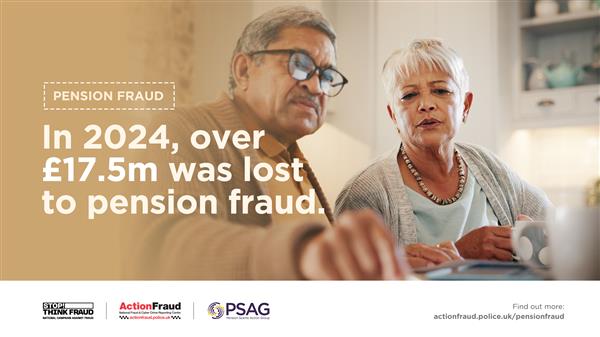
Savers and those reaching retirement age are being warned to protect their pensions and look out for criminals trying to catch people out of their life savings, with Action Fraud revealing a total annual loss of £17,567,249. This equates to roughly £48,129 lost to this type of fraud per day in 2024.

Data reveals there were 519 reports of pension fraud in total and £17,567,249 lost in 2024, with an average loss of £33,848 per person.

Action Fraud, with support from the Pension Scams Action Group (PSAG), launched a pension fraud awareness campaign, warning people to take extra measures to protect their pension scheme accounts and to be cautious of investment opportunity offers from criminals that could be targeting them.

How can you protect yourself against Pension fraud?

Secure your online pension account: the account you use to manage your pension should have a different password to all of your other accounts. Use three random words to create a strong and memorable password, and enable 2-step verification (2SV)

Ignore unsolicited calls about your pension: cold calling about pensions is illegal and likely a sign of a scam. If you’re thinking about changing your pension arrangements, you should get financial guidance or advice beforehand. 

Investment opportunities: don’t be rushed into making an investment. Remember, legitimate organisations will never pressure you into investing on the spot. 

You should treat investment opportunities with extreme caution if there’s: 

  • Pressure to invest (for example: time-limited offers).
  • Downplayed risk of losing your money.
  • Promised returns that sound too good to be true.

Remember to Stop! Think Fraud and find more information on how to protect yourself from fraud here: Stop! Think Fraud - How to stay safe from scams

What can you do if you have been a victim of pension fraud?

Report pension scams: if you’re worried about a potential pension scam or you think you may have been contacted by a criminal, report it to Action Fraud at actionfraud.police.uk or by calling 0300 123 2040.

If you have made a payment: inform your bank or pension provider as soon as possible, they can help you prevent any further losses. Monitor your bank and pension statements regularly for any unusual activity. 

https://www.actionfraud.police.uk/news/pensionfraud

Saturday, 6 September 2025

BBNWA JUN 2025 Crime Map Pins demo (no sound)

Hovering over crime type on June 2025 map to show hotspots spread for them on the wards.

 (select youtube settings and higher quality)


Thursday, 4 September 2025

The latest scams doing the rounds

You can always keep up to date on the most recent scams targeting people across the UK.

The latest warnings to be aware of include a Utility Warehouse impersonation email, a cryptocurrency scam call and fraudsters posing as the Financial Conduct Authority. Take a look at the full list, based on your reports to our Which? Scam Action Alerts Facebook community and to our scam sharer tool.


Source: Which? (03 Sep 2025)

Watch out for fake vehicle giveaways

We've spotted several premium vehicle competition scams on social media, with fraudsters posting tempting giveaways that aim to steal your personal and financial information.

We examine these dodgy competitions and share four telltale signs of a social media scam.


Source: Which? (04 Sep 2025)

Avoid scams when booking last-minute holidays

Searches on Google for 'last minute holidays' have spiked in recent weeks as hopeful holidaymakers try to book an escape before the summer is out, but those 'deals' may not be all they seem.

Take a look at some of the most common ways fraudsters carry out holiday scams and how you can spot the signs.


Source: Which? (30 Aug 2025)

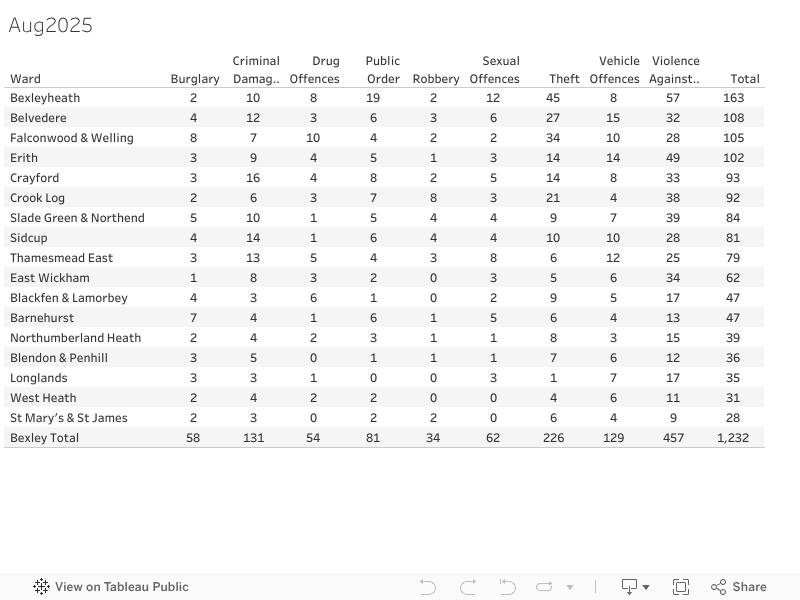
Bexley Crime stats ward summary Aug 2025


Scams doing the rounds right now

We want to keep you up to date on the scams targeting people across the UK right now. Take a look at the full list of warnings to be aware o...