Friday, 3 April 2026

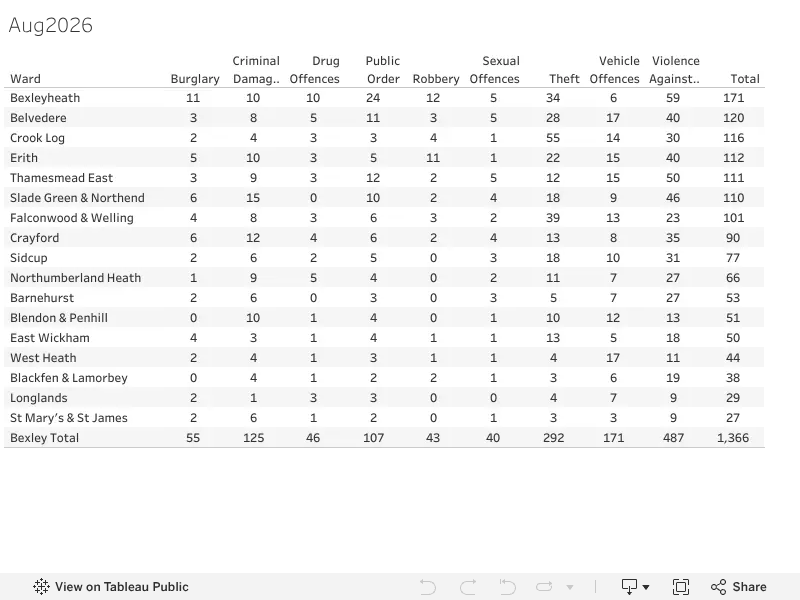
Bexley Crime stats ward summary Mar 2026


Source: Bexley Watch Viz

Thursday, 2 April 2026

Vehicle seizure Glenhurst Avenue - MetEngage St Marys and St James

Whilst officers from St Marys and St James Policing Team were on mobile patrol on Glenhurst Avenue, Bexley, their attention was drawn to a Ford Transit van due to the drivers behaviour. 

Upon noticing the police, the driver parked the vehicle, and the driver along with two  passengers exited the van and walked away. Officers stopped and spoke with the males, who were acting in an evasive manner.

Vehicle checks were conducted, which revealed that the van was uninsured and untaxed.
As a result, the driver was reported for driving without insurance, driving with an expired MOT, and being in possession of a class C drug.  Officers subsequently seized the vehicle. 


Source: https://www.metengage.co.uk/Alerts/A/424180/Vehicle-seizure-Glenhurst-Avenue 

Alert: Phishing Scam Targeting Antivirus Users


There is a sophisticated new email phishing scam targeting UK consumers.

Fraudsters are sending emails that impersonate a generic antivirus billing department, alerting you to a fictitious failed subscription renewal. The email uses urgent language and fear tactics to manipulate you into clicking a link and providing your credit card details.

Key Signs to Watch For:

  • The 'From' Address is a Giveaway: The email might display a name like "Antivirus Billing," but the actual email address is a random jumble of letters and numbers from a generic provider like Hotmail. This is a primary red flag.

  • Created Sense of Panic: The subject line is often generic (e.g., "RE: System notifications"), while the email content is aggressive, using terms like "FINAL NOTICE" and warning of "CRITICAL" risk levels if you don't act immediately.

  • Fake Urgency: The email lists multiple, made-up "failed" payment attempts to make the situation seem urgent.

  • An Unsolicited 'Deal': In an attempt to further lure you, they may offer a large, unsolicited discount for "renewing" through their link.

What You Should Do:

Do not click on any links, open attachments, or reply to this email. If you receive this message, it should be deleted immediately. If you have an actual antivirus subscription, you can check its status by logging directly into your account on the official company website or by using your trusted, official contact information for their customer service.

This scam has been reported to the UK National Cyber Security Centre at report@phishing.gov.uk. If you have clicked on a link in a similar email or are worried about a potential payment, you should contact your bank immediately and report it to Action Fraud.


Infographic Guide: Don't Take the Bait! (pdf)

Spotting a Phishing Email

1. CHECK THE SENDER

  • Red Flag: The name says "Antivirus Billing," but the email address is random gibberish: brnabawxfvf@hotmail.com.

  • Safe: A legitimate email from a known company will match their official domain (e.g., billing@mcafee.com or support@norton.com).

2. READ THE SUBJECT LINE

  • Red Flag: Generic or vague: "RE: System notifications."

  • Safe: Specific to your account, such as "Your Antivirus Subscription is About to Expire."

3. WATCH OUT FOR URGENCY & THREATS

  • Red Flag: High-pressure words in all caps: "FINAL NOTICE" or "CRITICAL RISK."

  • Safe: Clear, informative language that isn't designed to make you panic.

4. VERIFY INFORMATION DIRECTLY

  • Red Flag: A fake "Activity Log" of failed attempts created to pressure you.

  • Safe: Log in to your actual antivirus provider's official website. Do not use any links in the email.

Report Scams to: report@phishing.gov.uk

click image to view enlarged

Infographic Guide: Don't Take the Bait! (pdf)

Fake British Gas calls and other energy scams

As energy prices are set to increase, scammers are impersonating British Gas through cold calls. Worryingly, some call recipients noted that the caller knew personal information about them.

Energy scams are popular among fraudsters, so it pays to keep up to date with the latest tactics – find out about the most recent examples we've seen and how you can avoid and report them.

Source: Which? (31 Mar 2026)

HMRC scams are circulating

The tax year ends on 5 April, and as always, scammers are attempting to take advantage of this increase in activity by impersonating HMRC.

Take a look at some of the most common HMRC scams, and listen to real voicemails from scammers, so you can be prepared should they contact you.

Source: Which? (19 Jan 2026)

How to spot fake or fraudulent websites

Fraudsters can create fake websites that appear extremely convincing to the untrained eye. Recently, we've seen a rise in sites impersonating WhatsApp, encouraging users to download fraudulent apps or visit dangerous links via text, email and ads.

Here's what you need to know to stay safe, and nine expert-approved ways to spot whether a website is a scam or the real deal.

Source: Which? (30 Mar 2026)

Navigating Bexley Ward Alerts and MetEngage

Staying informed about local safety has never been simpler. The Bexley Borough Neighbourhood Watch (BBNWA) blog provides a streamlined way to access ward-specific updates and the Metropolitan Police's MetEngage alert system.

Quick Access via the Blog

Instead of manually searching through the Met Police website, you can use the dedicated 'Ward & MetEngage' tab on our blog:

  1. Select Your Ward: On the main page, you’ll find a comprehensive list of Bexley wards, from Barnehurst to West Heath.

  2. Ward Specifics: Clicking on a ward name takes you directly to its Safer Neighbourhoods Team page, where you can see your local officers and recent crime statistics.

  3. MetEngage Alerts: Clicking the 'MetEngage' link next to each ward opens the latest alerts specific to that area. This saves you from having to filter through alerts for the entire Metropolitan area.

Using the MetEngage Site Directly

If you prefer to use the official MetEngage portal:

  • Latest Alerts: Use the 'Latest Alerts' tab to see a broad view of police updates across London.

  • Postcode Search: On the homepage, scroll down to the 'Look up your local Safer Neighbourhood Team' section. Entering your postcode will bring up alerts and contact details specifically for your street.

Why Use These Links?

These shortcuts are designed to save you time. By bookmarking our Ward & MetEngage page, you can check for local burglary messages, ward panel meetings, and crime prevention advice in just a few clicks.

Stay safe and stay informed!


https://bexleywatch.blogspot.com/2026/03/working-together-for-safer-bexley.html

Bexley Crime stats ward summary Mar 2026

  Source: Bexley Watch Viz